Running a retail business the old manual way is no longer practical, especially when you need to manage multiple stores. Nowadays, a shop owner has to manage a physical store, a Facebook page, and an ecommerce website at the same time. Handling everything manually and all at once is not easy. This is where a Retail Order Management System plays an important role.
A Retail Order Management System is a type of software that helps shop owners work faster and more nimbly. It tracks, manages, and fulfills customer orders from one domestic platform. This system handles almost all store operations digitally, reducing the need for manual and physical work.
OMS in Modern Retail
A Retail Order Management System is a software solution that enables shop owners to process, monitor, and fulfill customer orders quickly through a centralized platform.How a retail OMS works accurately and completes all the activities how it is done has been explained.
Orders in an OMS system come from many different sources, such as:
This system checks inventory before confirming an order and keeps the stock updated in real time. It is especially useful for businesses in Bangladesh to prevent overselling. During festival seasons, customer demand increases significantly every year.
At that time, this feature helps a lot by reducing the risk of overselling and ensuring accurate stock control.
Orders are automatically routed to:
This reduces delays and shipping costs.
OMS integrates with delivery workflows, sending:
The OMS system tracks all purchases properly. It also makes returns, refunds, and exchanges very easy to manage. This is especially useful for Bangladeshi retailers, because customers here often change their decisions. If they are not satisfied with a product, they usually return it or exchange it for another one.
An OMS software comes with many features, but here the core features are highlighted. These are the features without which an OMS system is not complete.
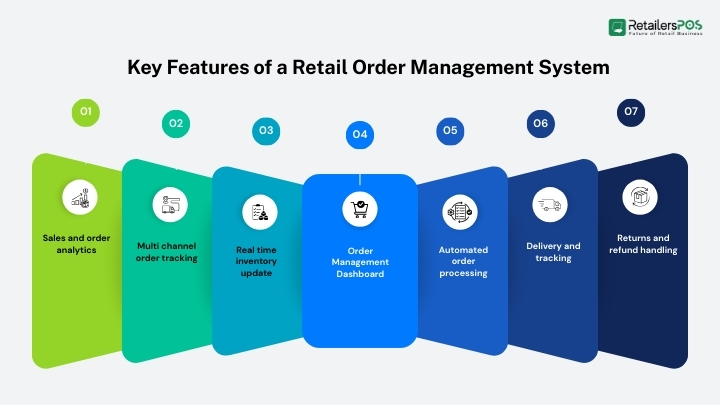
In an OMS system, all orders can be viewed, managed, and tracked from a single dashboard on one screen. This removes the need for manual work. The biggest advantage is automation, which reduces the chance of errors. As a result, both time and cost are saved.
This system updates stock limits in real time. So you can track accurate inventory information that is always available. With live inventory, retailers can avoid overstocking and overselling. During peak times, when handling customers becomes difficult, live inventory makes it much easier to keep track of stock.
In an OMS system, orders from physical stores, eCommerce websites, Facebook, and online marketplaces come into a single system. This allows everything to be controlled together at the same time. Managing all orders in one place increases work flow and improves overall profit.
Because of automated order processing, there is no need to confirm orders manually. When the user places and confirms an order, the system automatically completes it and updates the inventory accordingly.
This system fully tracks the delivery status from start to finish, until the product is handed over to the customer. During this process, it shows the delivery person’s details along with real time location updates.
The OMS system makes it easy to track customer refund products. When a customer returns a product, it is automatically added back to inventory and the customer receives the refund without any manual effort.
This system provides complete details for every sale. In addition, it offers detailed reports on sales performance, order trends, and customer behavior to help businesses make smarter decisions.
Retail Order Management Systems come in different forms to suit different businesses. It depends on business sizes, budgets, and working needs. Understanding these types helps retailers choose the right solution for their business.
Many retailers confuse these systems, but they serve different purposes:
POS: Handles billing and in store sales
Inventory Software: Tracks stock levels
OMS: Manages orders across all channels
An OMS connects POS and inventory management software systems to ensure end to end order control.
Using an OMS system offers many benefits. It speeds up work flow, saves time, and reduces errors. OMS software is a complete system that helps a business run smoothly. From customers to owners, using OMS software is very important to ensure satisfaction for everyone involved.
With the help of an OMS many processes can be automated. Such as inventory checks and order handling, which improves work speed and accuracy. An OMS helps retailers grow work flow while delivering a better customer experience.
By 2026, anyone running or managing a retail store should be using OMS software. To keep up with the times, you must upgrade and modernize your business. Today’s market is highly competitive, and surviving without the right systems has become very difficult. That is why, if used wisely, an OMS can help a business grow much more easily.
A retail OMS is ideal for:
Automation and AI have now become deeply integrated into our daily lives. Without automation managing everyday tasks has become very challenging. When it comes to business, the need is even greater. Without an OMS, retailers are likely to face several common problems, which are outlined below.
Retailers without an OMS often face:
Handling everything manually is no longer practical like before. To keep up with the times, you must update your business. If you want to run a retail business, using OMS software is a must. In retail, there is no real alternative to an OMS anymore. A Retail Order Management System is no longer optional; it is a necessity for modern retailers in Bangladesh.
If you are planning to start a retail business, you should definitely use OMS software. And if you plan to expand beyond a single store or sell online, investing in the right OMS will future proof your retail business.
The main purpose of an Order Management System is to organize the software. The other purpose is to track and manage customer orders from order placement to delivery, returns, and refunds. And most important keeping inventory details accurate.
Yes, an Order Management System can integrate with POS systems. In fact, this integration is needed for modern retail businesses. Especially in Bangladesh, where retailers often operate both physical stores and online sales channels.
The cost of a Retail Order Management System varies widely depending on your business. Here is the list of price some retail OMS software
Small Grocery Store
Cloud OMS basic plan
BDT 10,000/month
Includes central order dashboard+inventory
Multi-Outlet Fashion Retailer
Mid tier cloud OMS with analytics+marketplaces
BDT 25,000–30,000/month
Large Retail Chain
OMS+POS+Custom support
Enterprise pricing (based on requirements)
Running a retail business the old manual way is no longer practical, especially when you need to manage multiple stores. Nowadays, a shop owner has to manage a physical store, a Facebook page, and an ecommerce website at the same time. Handling everything manually and all at once is not easy. This is where a Retail Order Management System plays an important role. A Retail Order Management System is a type of software that helps shop owners work faster and more nimbly. It tracks, manages, and fulfills customer orders from one domestic platform. This system handles almost all store operations digitally, reducing the need for manual and physical work. OMS in Modern Retail Listed orders from online and offline stores Ensures accurate stock Automates delivery processes Upgrade customer experience and order accuracy How a Retail Order Management System Works A Retail Order Management System is a software solution that enables shop owners to process, monitor, and fulfill customer orders quickly through a centralized platform.How a retail OMS works accurately and completes all the activities how it is done has been explained. Order Received From Multiple Sales Channels Orders in an OMS system come from many different sources, such as: Physical retail stores eCommerce websites Facebook or WhatsApp orders Marketplaces The OMS collects all orders into one dashboard. Inventory Availability and Stock Sync This system checks inventory before confirming an order and keeps the stock updated in real time. It is especially useful for businesses in Bangladesh to prevent overselling. During festival seasons, customer demand increases significantly every year. At that time, this feature helps a lot by reducing the risk of overselling and ensuring accurate stock control. Order Routing Process Orders are automatically routed to: A nearby store A central warehouse A delivery partner This reduces delays and shipping costs. Shipping, Delivery, and Customer Notifications OMS integrates with delivery workflows, sending: Oder placed notification Order confirmation messages Shipping updates Location confirm Delivery notifications Delivery man details Customer received confirmation Review notification from customer Returns, Refunds, And Exchanges The OMS system tracks all purchases properly. It also makes returns, refunds, and exchanges very easy to manage. This is especially useful for Bangladeshi retailers, because customers here often change their decisions. If they are not satisfied with a product, they usually return it or exchange it for another one. Key Features of a Retail Order Management System An OMS software comes with many features, but here the core features are highlighted. These are the features without which an OMS system is not complete. Order Management Dashboard In an OMS system, all orders can be viewed, managed, and tracked from a single dashboard on one screen. This removes the need for manual work. The biggest advantage is automation, which reduces the chance of errors. As a result, both time and cost are saved. Real time inventory update This system updates stock limits in real time. So you can track accurate inventory information that is always available. With live inventory, retailers can avoid overstocking and overselling. During peak times, when handling customers becomes difficult, live inventory makes it much easier to keep track of stock. Multi channel order tracking In an OMS system, orders from physical stores, eCommerce websites, Facebook, and online marketplaces come into a single system. This allows everything to be controlled together at the same time. Managing all orders in one place increases work flow and improves overall profit. Automated order processing Because of automated order processing, there is no need to confirm orders manually. When the user places and confirms an order, the system automatically completes it and updates the inventory accordingly. Delivery and tracking This system fully tracks the delivery status from start to finish, until the product is handed over to the customer. During this process, it shows the delivery person’s details along with real time location updates. Returns and refund handling The OMS system makes it easy to track customer refund products. When a customer returns a product, it is automatically added back to inventory and the customer receives the refund without any manual effort. Sales and order analytics This system provides complete details for every sale. In addition, it offers detailed reports on sales performance, order trends, and customer behavior to help businesses make smarter decisions. Types of Retail Order Management Systems Retail Order Management Systems come in different forms to suit different businesses. It depends on business sizes, budgets, and working needs. Understanding these types helps retailers choose the right solution for their business. Cloud-Based Retail OMS Accessible from anywhere Lower upfront cost Ideal for small and medium Bangladeshi retailers On Premise Retail OMS Installed on local servers Higher setup cost Preferred by large enterprises with custom needs Standalone vs Integrated OMS Standalone OMS: Only manages orders Integrated OMS: Works with POS, inventory, accounting, and CRM systems Retail OMS vs POS vs Inventory Management System Many retailers confuse these systems, but they serve different purposes: POS: Handles billing and in store sales Inventory Software: Tracks stock levels OMS: Manages orders across all channels An OMS connects POS and inventory management software systems to ensure end to end order control. Benefits of Using a Retail Order Management System Using an OMS system offers many benefits. It speeds up work flow, saves time, and reduces errors. OMS software is a complete system that helps a business run smoothly. From customers to owners, using OMS software is very important to ensure satisfaction for everyone involved. With the help of an OMS many processes can be automated. Such as inventory checks and order handling, which improves work speed and accuracy. An OMS helps retailers grow work flow while delivering a better customer experience. Fewer manual errors Better inventory accuracy Improved customer satisfaction Easier handling of online and offline orders Highly possible growth for multi store retailers Who Needs a Retail Order Management System? By 2026, anyone running or managing a retail store should be using OMS software. To keep up with the times, you must upgrade and modernize your business. Today’s market is highly competitive, and surviving without the right systems has become very difficult. That is why, if used wisely, an OMS can help a business grow much more easily. A retail OMS is ideal for: Small retail shops expanding online Multi store retail chains Omnichannel retailers eCommerce and Facebook based sellers Wholesalers and distributors Challenges of Managing Orders Without an OMS Automation and AI have now become deeply integrated into our daily lives. Without automation managing everyday tasks has become very challenging. When it comes to business, the need is even greater. Without an OMS, retailers are likely to face several common problems, which are outlined below. Retailers without an OMS often face: Manual order tracking issues Stock mismatches and overselling Delayed deliveries Poor customer experience Difficulty managing returns Conclusion Handling everything manually is no longer practical like before. To keep up with the times, you must update your business. If you want to run a retail business, using OMS software is a must. In retail, there is no real alternative to an OMS anymore. A Retail Order Management System is no longer optional; it is a necessity for modern retailers in Bangladesh. If you are planning to start a retail business, you should definitely use OMS software. And if you plan to expand beyond a single store or sell online, investing in the right OMS will future proof your retail business. FAQs What Is the Main Purpose of an Order Management System? The main purpose of an Order Management System is to organize the software. The other purpose is to track and manage customer orders from order placement to delivery, returns, and refunds. And most important keeping inventory details accurate. Can OMS Integrate with POS Systems? Yes, an Order Management System can integrate with POS systems. In fact, this integration is needed for modern retail businesses. Especially in Bangladesh, where retailers often operate both physical stores and online sales channels. What Is the Cost of a Retail OMS? The cost of a Retail Order Management System varies widely depending on your business. Here is the list of price some retail OMS software Small Grocery Store Cloud OMS basic plan BDT 10,000/month Includes central order dashboard+inventory Multi-Outlet Fashion Retailer Mid tier cloud OMS with analytics+marketplaces BDT 25,000–30,000/month Large Retail Chain OMS+POS+Custom support Enterprise pricing (based on requirements)


Imagine a customer walks into your store, loves your product, and then walks out frustrated because the billing process took so long. That’s a lost sale you can’t afford. Retail Billing Software solves this problem before it starts. It’s not just a simple digital invoice maker. It helps you check out faster, keep inventory updated in real time, and serve customers smoothly. It doesn’t matter if you run a boutique or a multi-store chain; this software keeps your sales, stock, and staff in sync. In this guide, we’ll help you understand what retail billing software is and how it works. You will also know why it’s becoming essential for every modern retailer. How Retail Billing Software Works Retail billing software is the platform that connects store sales, inventory, and customer data into one place. It’s your ultimate data house to store all of your business information. Nowadays, most of the billing software has become cloud-based. People also recognize it as online billing software for a reason. It enables store owners to access data from anywhere, anytime. If we want to be specific, the primary module of a billing software is invoice creation. At the same time, it’s just the start of a perfect POS solution. A billing software will let you register products in its system with detailed information. There are options to add your product names, prices, tax rates, and categories. Product recognition is pretty easy with automated barcode generation and scanning. Inventory management is one of the essential features of a retail billing system. It shows how many items you have in your stock, along with the remaining quantity for each item. What’s more, it saves a lot of time for businesses by providing fast billing through barcode scanning. At the checkout counter, it automatically applies taxes, offers, and discounts on the invoice. To make your retail business path smooth, you must choose a POS System with features such as: Multi-mode payment handling Real-time inventory updates Automated reports and business insights Integration capability with other retail tools In a whole, a retail billing solution is the way to transform the business the way it needs to be. It can easily handle product variations like size, brand, color, and unit types. Moreover, the availability of multiple payment options is vital for a retail business. POS billing software lets you accept payments through cash, cards, digital wallets, QR codes, and UPI. It also helps you track payment records for easy accounting and cash settlements. Types of Retail Businesses That Need Billing Software With business strategies and market trends evolving rapidly, manual billing is no longer a practical option. Business owners need to focus on delivering better customer service and building a strong reputation. Especially when you’re dealing with a retail business, you must satisfy customers with a fast checkout process. That’s where billing software works like magic. It’s a blessing for businesses that deal with fast-moving inventory. It also helps those who use multiple payment methods or offer special deals to customers. Most of the retail businesses have already started to implement billing software to increase efficiency. By 2033, the retail billing software market size is expected to reach $10.2 billion, according to Verified Market Reports. In the meantime, let’s find out which retail business requires billing software. Single-Store Retailers Single-store retailers are independent retail businesses that operate with only one physical location. This type of business is typically niche-specific, whereas many others sell a variety of items. It can range from grocery shops, apparel boutiques, or bookstores that also sell toys. Why would someone spend their money to buy sales billing software when there’s only one store to manage? Well, normally, single-store retailers have limited resources and staff. On the other hand, it must maintain inventory, sales, billing, and customer service simultaneously. Retail POS System is the ultimate solution to manage all of these from one place, efficiently. It can generate fast, error-free invoices that save time when paying the bill. Additionally, real-time inventory tracking enables easy restocking of items to prevent product shortages. For example, a customer arrived at your store for a pack of stapler pins. You have to search the entire shop if it’s not in front of your eyes. But if you operate your shop with a billing software, you can easily keep an eye on your stock from the POS screen. That’s how automation makes our tasks easier and saves our valuable time. Specialized Retailers Specialized retailers or specialty stores target a specific product category or niche. Bookstores, toy shops, stationery shops, cosmetics stores, etc, are the commonly operated specialty stores. These businesses usually handle unique inventory types that are very specific. Sometimes, they require customer-specific preferences that need tailored billing and inventory processes. Retail billing system supports barcode scanning and helps you bundle products as needed. You can manage product variants like size, brand, or quantity. It also lets you create customized invoices for your customers. For example, ISBN scanning is a must-have for bookstores, where serial number or model tracking is necessary for toys and gadgets. Generating weekly or monthly reports is equally important to run a calculative business. Using a billing software will meet all the necessities of a specialty store. Multi-Outlet or Chain Stores Multi-outlet or chain stores are one kind of retail business that operates from multiple physical locations. Usually, they run under the same brand name or management. However, they offer similar types of products in all branches. That’s where billing software for chain stores is essential to maintain consistency in pricing, and inventory. Managing this kind of store manually can lead to operational gaps, duplicate data, and reporting delays. A retail store billing software can connect all locations through a unified system to adjust stock, pricing, and reporting. It enables you to have insights on every store separately. Growing retailers will benefit from expanding their business and increasing efficiency by analyzing data. Furthermore, a multi-store business requires a complete billing system to: Standardize pricing and discounts across all outlets. Manage user roles (cashiers, managers, owners) and permissions for different locations. Share purchase history with a centralized system while managing customer loyalty programs. Seasonal and Pop-Up Shops Seasonal and pop-up shops are temporary retail setups that are operated for a short time or occasionally. These types of shops are usually seen as festival stalls, holiday markets, trade show booths, or event-based stores. You can also find them in high-traffic areas or front of a giant shopping mall. As these shops are operated for a short time, they require fast, efficient, and accurate billing to cover a large number of customers. They generally target pick hours to maximize their profitability by serving more customers. Since they have to deliver fast service, using smart billing software increases the checkout speed. It’s easy to set up the system and manage the business as long as they’re selling. These portable POS software contains features like quick product entry, portable billing, offline mode, and real-time monitoring. It’s easy to generate an instant day-end cash report to overlook profitability. Benefits of Using Billing Software in a Retail Business Retail business grows on speed, accuracy, and customer satisfaction. Automation is the key to achieving these things. Manual billing processes can slow down business operations, increase human error, and limit your ability to scale effectively. That’s where retail billing software is necessary for the business. It makes your store operation faster, smarter, and efficient. However, what are the key benefits of using POS software in a retail business? Let’s focus on how it could impact our retail operation. 1. Quick Invoice Creation The more customers you serve, the more profit you can make from the business. It depends on how quickly you clear a customer at the checkout point. You must follow the best strategy to maximize your sales during busy hours. Upgrading your POS cashier system is an ideal move to handle rush hours efficiently. Fast and accurate billing is vital to keep your hands free while dealing with the cash counter. 2. Real-Time Inventory Tracking Inventory tracking is one of the advantageous features of any retail billing software. Real-time inventory tracking keeps the stock updated each time, generating sales or restocking items. It’s important to know what you have in your inventory and what needs to be stocked. A report by Coinlaw demonstrates that 74% of retail businesses follow POS insights to optimize their inventory and fix stock issues. It also keeps you updated on which products are slow-moving and which are most in demand in the area. The same report shows that wasted inventory rates were minimized by 22% with the help of the POS System data. 3. Return and Exchange Management Returns and exchanges are common parts of business. However, managing them manually can be stressful for busy shops and outlets. This led to stock adjustment errors, revenue mismatches, and eventually unhappy customers. Sales billing software took away these problems by offering benefits like: Return and exchange processing from the original invoices. Real-time stock update upon returns or exchanges. Instant credit voucher or replacement bill generation. Clear return history and reports in the system. 4. Centralized Control for Multi-Store Business Every multi-store business needs price syncing, accurate stock tracking, fast billing, and tax-ready reports, all in one place. Managing multiple or chain shops is a real struggle without selecting the best POS software. Let’s say you’re running a campaign of 5% discount on grocery items in your chain shops. How could you adjust them? Isn’t it time-consuming to calculate the discount for every grocery item separately? However, using a centralized POS solution automatically calculates the discount and applies it to all outlets. Assigning user roles is also a useful module of billing software. You can set data access based on roles, such as manager, cashier, salesperson, etc. It ensures sensitive business information like sales summaries or profit margins is only visible to authorized users. 5. Operational Cost Reduction Cost reduction is a regular strategy and a healthy practice in the retail sector. Running a retail business contains many hidden costs that affect revenue growth. Inventory losses, time wasted in checkout, and manual errors are significant issues that increase operational costs. On the contrary, a retail billing software helps with better forecasting and informed decision-making. Additionally, it reduces manpower needs in sectors such as data entry and stock matching. It also benefited a business with: Automated billing and tax-compliant invoices. Minimize inventory losses by preventing overstocking, understocking, and unnoticed shrinkage. Serve more customers in less time, which means maximizing your sales with the same number of employees. Cloud backup ensures the safety of your customer and stores data. Eliminate the necessity of writing down your inventory, amount of sales, and profitability. You can have all the information in the system. What to Look for Before Choosing a Retail Billing Solution Choosing the right retail billing software is a crucial decision for the business. It has direct impacts on your daily retail operation. Not every business fits with any billing system. Different business types require different features to maintain their operation. To grow your business and run it more efficiently and accurately, you need to choose the right Store Operations Software. Therefore, before choosing your go-to retail billing solution, what are the things you must consider? Budget Consideration There’s a lot of POS software out there that you can choose for your store. However, different software solutions offer different pricing. Few providers offer a monthly subscription, while a lifetime purchase is also an available option. You can also purchase add-ons to increase your features and productivity. But the important part is selecting the price range that aligns with your business size and revenue. Using expensive billing software for retail stores can contradict your business, which affects your revenue. Industry-Specific Features First, you have to understand your business well. Know what your business is about, what it offers, and who your customers are. This will help you decide which features are truly important for your business. It will make your software selection easy based on your preference. For example, if you’re running a grocery store, you may be looking for perishable inventory management. Whereas, an electronic shop management system doesn’t need this. In the same way, weighing scale integration, MRP-based billing, and loose item billing are mandatory for a grocery store. In brief, focus on your necessity; you don’t need all of the features a software offers. Fast and Easy-To-Use Interface A complex and unnecessarily feature-rich software can slow down your store's operation. Especially in peak hours, this decreases productivity by taking so long at the checkout. With a clean user interface and intuitive navigation, you can quickly complete the checkout process in a few clicks. A user-friendly interface helps staff work faster at the cash counter. It also keeps customers happy by reducing wait times. Sales Reporting and Detailed Business Insights At that moment, data is the key to staying ahead in the competition. Whether it's a business or a marathon run, you must know your capabilities. Organized and structured data will let you know how your business is performing. You can also get: Daily, weekly, monthly, and yearly sales summary. Track best-selling products and low-performing products. Monitor outlet-wise performance for chain stores. Compare sales across categories and specific hours of the day. Monitor promotional campaigns from business analytics. Overall, these are valuable insights for identifying opportunities and avoiding costly mistakes. Final Words In short, retail billing software is the backbone of smarter, quicker, and more profitable retail operations. Billing software isn’t an option anymore, it’s a mandatory upgrade that your business demands. As you’ve seen, it does more than just printing receipts. From organizing your stores to speed up billing and real-time inventory tracking, it can handle almost everything. You can even reduce operational costs and generate reports to make smart business moves.