Retail business management software is like having a smart helper behind the counter. Management software is one place where you can manage your sales, stock, customers, and reports without jumping between different apps or messy spreadsheets. It keeps your store’s daily work organized, so you always know what’s going on.
Most store problems don’t happen because you’re not working hard. They happen because things don’t match up. You think an item is in stock, but it’s not. Prices get changed in one place but not another. Reports take too long, and you end up guessing instead of seeing the real numbers. This software connects everything, so when you sell something, the inventory updates right away, and you can track what’s moving fast and what needs to be reordered.
In the end, it’s not just another tool or a normal app/software. It helps your store run smoother, reduce mistakes, and saves time. Retail business management software gives you breathing room. So you can spend less energy fixing daily issues and more time building your business.
Retail business management software is like a main connecting hub for your store. It brings everything together in one place inventory tracking, your POS checkout system, customer details, staff management. Retail business management clear reports with useful insights.
Instead of juggling a basic POS tool plus spreadsheets and still dealing with mistakes. This software connects the whole operation so things stay accurate and up to date automatically. Whether you’re running one shop or managing several locations. It helps your day to day work feel simpler, faster, and much easier to scale as you grow.
Retail Business Management Software brings all the pieces of your retail business together in one simple connected system. It’s built to make everyday tasks easier and help your business grow. You can manage inventory, sales, customers, and reports all in one place without the stress or confusion.
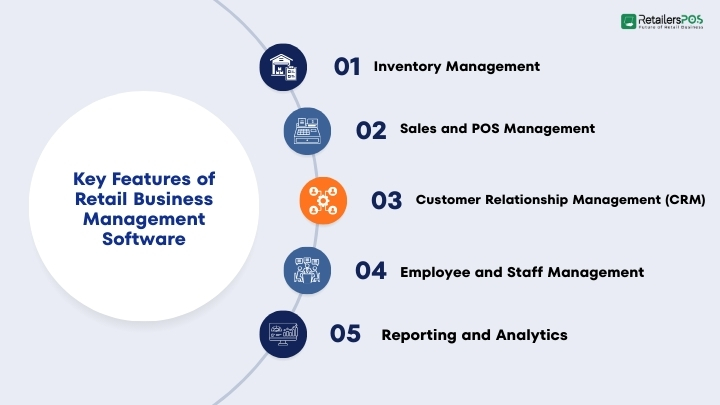
Inventory management helps retailers keep track of their products in real time. It shows how much stock they have at any moment.You can manage different product versions, like sizes or colors, all in one place. You can also set alerts to remind you when it’s time to restock. This helps you avoid having too much stock or running out of popular items.
With inventory management in retail, you always know what’s available, what’s selling quickly, and what’s not doing well.
Sales and POS Management
Sales and POS management helps you bill customers quickly and correctly. It makes checkout smooth and easy.You can accept different payment methods, like cash, cards, or digital payments. You can also apply discounts and handle returns without confusion.
At the same time, the system updates your inventory and accounting automatically. This means your stock levels and sales records stay accurate, without extra work.
Customer Relationship Management (CRM)
CRM features help you keep all customer information in one place. You can store details like contact info, past purchases, preferences, and loyalty points.Because of this, you can send more personalized offers and messages. Customers feel valued and understood.
As a result, they are more likely to come back and shop again. This helps you build strong relationships and increase repeat sales.
Employee and Staff Management
Employee management tools help you manage your team more easily. You can create staff schedules, track attendance, and monitor performance in one place.You can also set role based access. This means each employee only sees and uses what they need for their job.
Because of this, you spend less time on paperwork. At the same time, your team stays organized and works more productively.
Reporting and analytics help you understand how your business is doing. You can see sales trends, how fast products are selling, customer behavior, and overall profits. These reports turn your data into clear insights.
So, instead of guessing, you can make smart decisions based on real numbers. With this information, you can plan better, improve weak areas, and grow your business with confidence.
Retail stores deal with problems day to day that can quietly reduce profits and customer satisfaction. For that incorrect stock counts, long lines at the checkout, wasted time on manual paperwork. As a result not having a clear view of what’s happening across the business. When these issues stack up, it becomes harder to keep shelves stocked, serve customers quickly, and make smart decisions.
Retail business management software helps solve these challenges in quick times. By bringing everything into one place and automating routine tasks. It can track inventory in real time, reduce pricing and stock errors, speed up billing and payments. This system also organizes staff schedules and roles, and generates easy to read reports on sales, best selling products, and customer buying patterns. Instead of switching between spreadsheets, notebooks, and different systems, store owners and managers get one centralized dashboard they can trust.
With accurate data and smoother workflows, retailers spend less time fixing mistakes. They get more time improving what matters most, creating a better customer experience. Also can focus on running promotions, building loyalty, and planning growth. It also makes it easier to manage multiple branches, reduce losses, and respond faster to changes in demand.
With a smarter system in place, you’ll always know exactly what’s in stock. That means fewer costly mistakes, less over ordering, no running out of popular items at the wrong time, and a big reduction in shrinkage or missing products. Your inventory stays accurate, organized, and easy to manage. Checkout becomes faster and smoother too. With a more useful POS process and fewer pricing errors, lines move quickly and customers leave happy. A better checkout experience not only improves satisfaction but also increases the chances they’ll come back again.
Managing multiple store locations becomes simple with everything connected in one dashboard. You can control pricing, track stock, and monitor sales performance across all branches without confusion. It keeps your operations consistent and gives you a clear picture of how each location is performing. Your team will work more usefully as well. Clear role assignments, easy attendance tracking, and faster shift planning help reduce downtime and confusion. When staff members know exactly what they need to do, daily operations run much more smoothly.
Real time reports give you the insights you need to make smarter decisions. You can instantly see sales trends, best selling products, slow moving stock, and peak shopping hours, helping you plan better promotions, purchasing, and staffing. All of this leads to stronger profits and smoother operations. By saving time, reducing errors, and controlling costs, you improve overall performance and create more room for growth and long term success.
Retail business management software is designed to help store owners run their daily workflow more smoothly and expertly. It is especially useful for:
This type of software helps retailers save time, reduce errors, improve customer service, and make better business decisions using clear reports and data.
How to Choose the Right Retail Business Management Software
When choosing the right retail business management software, it is important to carefully evaluate several key factors to make sure the system fits your business needs both now and in the future.
Choose software that matches your current store size but can also grow with your business. If you plan to open new branches, add more products, or expand online, the system should handle that growth without needing a complete replacement.
The software should be simple and user-friendly. Your staff should be able to learn it quickly without long training sessions. A clean dashboard and clear navigation can save time and reduce mistakes at checkout.
Make sure the software includes the features your business actually needs. This may include inventory tracking, barcode scanning, billing, CRM tools, employee management, reporting, or loyalty programs. Avoid paying for features you will never use.
If you sell online or use accounting software, your retail system should connect smoothly with those tools. Every e-commerce needs a multi-channel inventory system. This helps sync sales, inventory, payments, and financial data automatically, reducing manual work and errors.
Your business data must be protected. Check if the software offers strong security features like data encryption and user access control. Also decide whether you prefer a cloud based system. This system is accessible from anywhere or an on premise setup installed locally.
Reliable customer support is important in case technical issues come. Look for providers that offer fast support, regular software updates, and improvements to keep your system secure and up to date.
By considering these factors, you can choose software that improves efficiency, supports growth, and helps your retail business operate smoothly.
Retail business management software pricing can depend on several factors. The cost usually depends on the features included, the number of users who need access, the size of the business. And the most important is whether the system is cloud based or installed on site.
Most software providers offer different pricing models, such as:
While low cost options may seem appealing at first, they may lack important features, security, or reliable support. Over time, this can lead to inefficiencies, errors, and higher operational costs.
Investing in a reliable, secure, and scalable solution often provides better long-term value. A strong system can reduce billing mistakes, prevent inventory losses, save staff time, and improve decision making. In the long run, the efficiency gains and improved accuracy can outweigh the initial investment and help the business grow more smoothly.
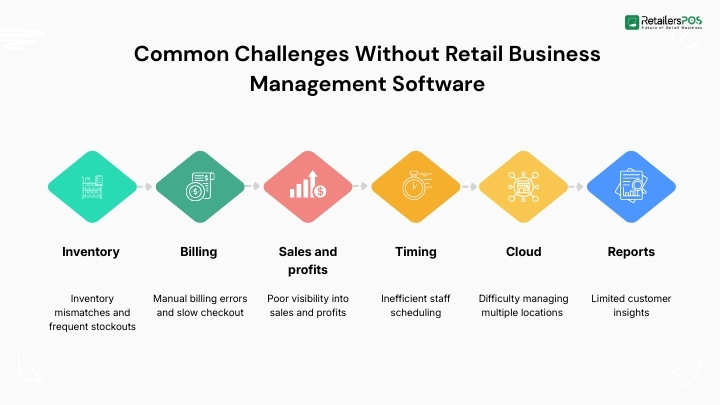
Retailers who do not use management software for ecommerce often struggle with daily operations.This type of a problem that can slow down growth and reduce profits. Without a proper system in hand managing the business becomes more difficult and time consuming. Common challenges include:
Using retail management software helps solve these issues by automating processes. That also improves accuracy, and provides clear insights for better business decisions.
Retail business management software is no longer just a helpful tool. It has become a necessity for running a modern and competitive retail store. Today’s retail environment moves fast. Customers expect quick checkout, accurate billing, product availability, and personalized service. Without the right system in place it becomes difficult to meet these expectations.
Choosing the right retail business management software can transform how your store operates. It not only improves expertly in the short term but also supports long term growth and profitability. Investing in the right system today can set your retail business up for a lasting success in the market.
Many systems include an offline mode for POS operations, automatically syncing your data once you’re back online.
Yes, most modern solutions support mobile devices and tablets, making it easy to handle billing, inventory checks, and reporting on the go.
Most providers offer data migration tools or support to help securely transfer inventory, sales, and customer data.
Updates are usually released on a regular basis to add new features, improve security, and fix bugs.
Many platforms support multiple currencies, tax rules. And some regional compliance settings to make managing different markets easier.
Yes, customization options are easily available, depending on the provider and the plan you choose.
Most providers let you export your data, but since policies can depend. It's a good idea to review the terms before purchasing.
Yes, many solutions integrate with ecommerce platforms, making it easy to manage both online and in-store sales in one place.
Some systems come with supplier management tools. And the system helps handle purchase orders, track vendors, and manage stock replenishment.
Support system availability can depend by provider, but many offer round the clock help with their premium plans.

Starting a superstore is an exciting business idea. It can bring in steady income and long term growth. But success does not happen by luck. You need a clear plan before you open your doors. A good retail business plan for a superstore helps you stay focused and organized. It shows you how much money you need, how to manage your daily costs, and how to make a profit. It also helps you understand your customers and your competitors. Most importantly, it gives you a clear path to follow as your business grows. In this guide, you will learn how to create a complete superstore business plan step by step. What Is a Superstore? A superstore is a very large retail shop that sells many different types of products in one building. It gives customers a simple and easy way to shop in one place. Instead of going to many small stores, people can buy almost everything they need at a superstore. For example, they can shop for groceries, home supplies, clothes, electronics, and personal care items during the same visit. Superstores are popular for several reasons. First, they save time because customers do not need to travel to different locations. Second, they offer a wide variety of products, so shoppers have more choices. Third, prices are often lower because superstores buy products in large amounts and can offer better deals. In short, a superstore makes shopping faster, easier, and more convenient for customers. Why You Need a Retail Business Plan for Superstore A retail business plan works like a roadmap for your superstore. It shows you where you want to go and how to get there. When you have a clear plan, it is easier to make smart decisions and avoid costly mistakes. Without a proper plan, many problems can happen. You might spend too much money at the start. You may order too much stock or not enough. You could also struggle to attract customers. These issues can slow down your growth or even cause your business to fail. A strong business plan helps you: Understand who your target customers are Estimate your startup costs and monthly expenses Decide which product categories to sell Set the right prices for your products Reduce risks by planning ahead Attract investors or lenders who may help fund your business When you take time to plan carefully, you build a strong foundation. As a result, you increase your chances of long term success and steady profits. Choose Your Superstore Type and Store Concept Before you invest your money, you need to decide what type of superstore you want to open. This is a very important step. Your choice will guide everything else, from pricing to marketing. Some superstores focus mostly on groceries. Others sell a mix of products, such as groceries, clothing, electronics, and home goods. You can also choose your pricing style. For example, you might open a discount superstore that offers low prices and special deals. Or, you may start a premium superstore that focuses on high quality products and better shopping experiences. Next, you should clearly define your store concept. Ask yourself these simple questions: Who are your target customers? What price range will you offer? What makes your store different from competitors? When you answer these questions, your vision becomes clear. As a result, it becomes easier to build your brand, design your store, and create a strong marketing strategy. A clear concept helps customers understand your business and remember your store. Market Research to Know Your Buyers Market research is one of the most important parts of your retail store business plan. It helps you understand your customers and their needs. When you know what people want, you can make better business decisions. First, study the local population. Look at their age groups, income levels, and shopping habits. For example, if your area has many middle-income families, you should focus on affordable groceries, school supplies, and daily household items. On the other hand, if the area has young professionals, you may include ready to eat meals, electronics, and trendy products. There are several simple ways to do market research. You can: Conduct short surveys in your community Observe nearby stores and see what sells well Check social media trends Study local business and population data When you clearly understand customer demand, you can choose the right products. As a result, you avoid wasting money on items that do not sell. This reduces business risk and increases your chances of success. Competitor Analysis Every superstore has competition. So, you must study your competitors carefully before you open your store. When you understand what other stores are doing, you can find ways to stand out. First, visit nearby superstores. Look at their prices, product variety, store layout, and customer service. Notice how they display products. Pay attention to how long customers wait at checkout. Also, see how clean and organized the store looks. Next, think about what they do well and where they make mistakes. For example, maybe their prices are high. Maybe their store feels crowded. Or maybe their staff is not very helpful. You might: Offer better prices or special discounts Create a cleaner and more organized store layout Provide faster checkout service Stock a wider or better selection of products Train staff to give friendly customer service When you analyze your competitors, you can clearly see your opportunities. As a result, you can position your superstore in a smart way and attract more customers. Location and Store Layout Plan Location is one of the most important factors in retail success. Even the best superstore can struggle if it is in the wrong place. That is why you must choose your location carefully. Look for an area with high foot traffic. This means many people pass by your store every day. Good road access is also important, so customers can reach your store easily. In addition, make sure there is enough parking space. A growing residential area is often a smart choice because more families will need daily products. On the other hand, avoid hidden locations with low visibility. If people cannot see your store, they may not visit it. Store Layout Planning After choosing the right location, focus on your store layout. A well-planned layout makes shopping easy and comfortable. It also helps increase sales. Here are some simple tips: Keep aisles wide and clean so customers can move freely. Organize products clearly by category. Place daily essential items, like milk and bread, at the back. This encourages customers to walk through the store and see more products. Use clear signs so customers can find items quickly. Display promotional or discounted products near the entrance to grab attention. When your location and layout are well planned, customers enjoy their shopping experience. As a result, they are more likely to return and recommend your superstore to others. Products and Inventory Plan Products are the heart of your superstore. If you choose the right products and manage them well, your store will run smoothly. A clear product and inventory plan helps you stay organized, reduce waste, and increase profits. Product Categories Your superstore should be divided into clear product sections. This makes shopping easier for customers. It also helps you manage stock more effectively. Common product categories include: Groceries and Fresh Food – fruits, vegetables, meat, dairy, and bakery items Frozen and Packaged Food – frozen meals, snacks, canned goods, and beverages. Household Cleaning Supplies – detergents, disinfectants, paper products. Personal Care Products – soap, shampoo, toothpaste, skincare items. Clothing and Accessories – basic wear, seasonal clothing, shoes. Electronics and Home Appliances – small kitchen appliances, gadgets, and accessories. You can adjust these categories based on your target customers. For example, if you serve families, focus more on groceries and school supplies. If your customers are young professionals, include more ready-to-eat meals and electronics. Inventory Management Inventory management is just as important as product selection. Poor stock control can lead to serious losses. For example, overstocking ties up your money and increases waste. On the other hand, running out of popular items can disappoint customers. To manage inventory properly: Track daily sales Monitor fast moving and slow moving items Avoid ordering too much stock Prevent stock shortages Check product expiry dates regularly Using inventory management software can make this process easier. It helps you track stock levels in real time and sends alerts when items are low or close to expiry. Good inventory control improves cash flow. It also reduces waste and keeps your shelves organized. As a result, your superstore becomes more efficient and profitable. Pricing Strategy Pricing plays a major role in attracting customers and generating profit. If your prices are too high, customers may shop somewhere else. If your prices are too low, you may struggle to make a profit. That is why your pricing strategy should match your target market and business goals. For example, if your customers are middle income families, affordable and competitive prices will work best. On the other hand, if you are targeting premium shoppers, you can focus on value and quality instead of low prices. Common Pricing Methods Cost plus pricing is a simple method where you add a fixed profit margin to the product’s cost. For example, if an item costs $10 and you add a $2 margin, you sell it for $12. This method ensures consistent profit on each sale. Competitive pricing means setting your prices close to what other superstores charge. This helps you stay competitive and avoid losing customers to nearby stores. Discount pricing focuses on lower prices, special offers, and seasonal promotions. This strategy attracts price sensitive shoppers and increases store traffic. Bundle pricing encourages customers to buy multiple products together at a slightly reduced price. For example, offering combo deals can increase the total amount customers spend. By combining these pricing methods wisely, you can boost sales while maintaining healthy profit margins. Marketing Plan Marketing helps customers discover your superstore and learn about your offers. Without proper marketing, even a well designed store may struggle to attract buyers. That is why you need a clear marketing plan that includes both online and offline strategies. When you promote your store consistently, you build trust and encourage repeat customers. Online Marketing Online marketing helps you reach more people quickly. First, create a simple and user-friendly website that shows your products, offers, and store details. Next, register your business on Google Maps so customers can easily find your location and contact information. You should also use social media platforms like Facebook and Instagram to share updates, discounts, and new arrivals. Running paid advertisements can further increase visibility in your local area. In addition, offering online promotions or home delivery services can attract busy customers who prefer shopping from home. Offline Marketing Offline marketing is just as important, especially for local customers. You can distribute flyers in nearby neighborhoods to introduce your superstore. Banners and posters placed in high traffic areas can also increase visibility. During your grand opening, offer special discounts and promotional deals to attract attention. You may also partner with local businesses, schools, or community groups to spread awareness. When people see your brand often, they are more likely to visit your store. A balanced marketing approach helps your superstore grow steadily and stay competitive. Daily Work Plan System Running a superstore requires daily monitoring and strong discipline. Without a clear system, small problems can quickly turn into big ones. That is why you need a daily work plan. A structured system helps your team stay organized, complete tasks on time, and maintain high service standards. It also improves overall efficiency and customer satisfaction. Daily Tasks Your daily checklist should cover all important store activities. Start by checking inventory levels to make sure popular items are in stock. Review daily sales reports to track performance and identify fast moving products. Supervise staff to ensure they are doing their jobs properly and assisting customers when needed. You should also restock shelves regularly so the store looks full and organized. Cleaning the store is essential to maintain hygiene and create a pleasant shopping environment. Finally, handle customer questions and complaints quickly and professionally. When daily tasks are completed consistently, your superstore runs smoothly and builds customer trust. Staffing Plan Your staff plays an important role in your superstore’s success. Friendly and trained employees create a positive shopping experience. Good customer service encourages people to return. Common staff roles include a store manager who handles daily operations, cashiers who manage billing, sales associates who assist customers, an inventory manager who controls stock, security staff who ensure safety, and cleaning staff who keep the store neat. Hiring responsible employees and giving them basic training improves productivity and customer satisfaction. Legal and Licenses Before opening your superstore, you must complete all legal formalities. This step is very important. If you ignore legal requirements, you may face fines, penalties, or even store closure. The exact rules depend on your country and city, so always check local government regulations. Following the law protects your business and builds customer trust. Common Licenses Although requirements may vary, most superstores need several basic licenses. These usually include business registration to legally operate, a trade license to run commercial activities, and tax registration to handle sales taxes properly. If you sell food items, you may also need a food safety license and health permits. Getting the correct licenses before opening helps you avoid future legal problems and ensures smooth business operations. Financial Plan A financial plan helps you understand if your superstore can make a profit. It shows how much money you need to start and how much you must earn to cover expenses. Without a clear financial plan, you may run out of money quickly. Careful planning helps you control costs and make smart decisions. Startup Costs Startup costs are the expenses you pay before opening your store. These usually include the rent deposit, store renovation, shelves and racks, billing systems, and initial inventory. You must also pay for licenses and early marketing activities. Since these costs can be high, you should calculate everything carefully before investing. Monthly Expenses Monthly expenses are the regular costs of running your superstore. These include rent, employee salaries, electricity and water bills, restocking products, maintenance, and marketing. Tracking these expenses every month helps you manage cash flow and avoid financial problems. Profit Estimation To estimate your profit, subtract your total monthly expenses from your total sales revenue. If sales are higher than expenses, your business is profitable. It is also wise to keep emergency funds that can cover at least six months of expenses. This safety fund protects your superstore during slow sales periods or unexpected challenges. Funding Plan Opening a superstore requires strong financial support. You need enough capital to cover startup costs and manage expenses until the business becomes stable. That is why having a clear funding plan is important. It shows how you will raise money and how you plan to use it. A well-prepared funding plan also increases your chances of getting approval from banks or attracting investors. Where Does the Money Come From ? Funding can come from different sources. Many business owners start with personal savings to reduce debt. Others apply for bank loans to cover large startup costs. You may also partner with someone who invests money in exchange for a share of the business. Some entrepreneurs seek private investors or apply for government support programs and small business schemes. The best funding option depends on your financial situation and how much risk you can handle. Choosing the right source of funds helps your superstore start strong and grow with confidence. Risk Plan Every superstore faces some level of risk. No business is completely risk-free. However, when you plan ahead, you can reduce problems and protect your investment. A good risk plan helps your business stay stable, even during difficult times. Common Risks Some common risks in a retail order management business include low customer traffic, which can reduce sales. Strong competition from nearby stores can also affect your profits. Theft and shoplifting may cause financial losses. In addition, inventory damage, expired products, or poor storage can waste money. Economic slowdowns may also reduce customer spending. Solutions Although these risks are common, they can be managed with proper planning. Installing security cameras and hiring security staff can reduce theft. Offering promotions and improving customer service can attract more customers. Monitoring inventory carefully helps prevent overstocking and product damage. Keeping emergency funds can also protect your business during slow periods. When you prepare for risks in advance, your superstore becomes stronger and more secure. Growth Plan When your superstore becomes stable, it is time to focus on growth. Growth helps you increase profits and build a stronger brand in the market. Instead of staying at the same level, you should look for new opportunities to expand. You can start by adding new product categories based on customer demand. Introducing a loyalty program can also encourage repeat customers and increase sales. In addition, launching an online store allows you to reach more people and offer home delivery services. If your first location performs well, you may even consider opening new branches in other areas. Careful growth planning helps your business expand in a smart and controlled way. As a result, you improve long term profitability and strengthen your brand presence. Conclusion A retail business plan for a superstore is important for long-term success. It acts like a roadmap that guides your decisions, helps control costs, and reduces risks. When you plan key areas like location, products, pricing, marketing, staffing, and finances, your superstore has a much better chance of becoming profitable. Do not rush the process. Take time to research your market, plan each step, and set clear goals. Then follow your plan and improve as you learn. With the right strategy and consistent effort, your superstore can grow steadily and succeed in a competitive market. FAQs How Much Investment Is Required to Start a Superstore? It usually costs $70,000 to $3 million, depending on size and location. In South Asia, it may cost 10 lakh to 2+ crore BDT. What Licenses Are Required to Open a Superstore? You usually need these licenses: Business Registration, Trade License, Tax Registration (TIN/VAT/GST), Food Safety License, Fire Safety Certificate, Health & Safety Permit, Signage Permit. Requirements may vary by country and city. Always check with your local authority. What Technology Is Needed for a Modern Superstore? A modern superstore needs a POS system like retailters pos system. The system has barcode scanners for billing, inventory software to track stock, and accounting software to manage finances. It should also have CCTV for security and digital payment systems for cashless transactions. Larger stores may use an ERP system and offer online ordering for home delivery.